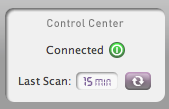
The Control Center
The Control Center provides two important pieces of information: a) whether you are 'Connected' (a green light) or 'Disconnected' (a red light) to the ClickRight Cloud; and b) when the last scan of your backup set has occurred.
Should you be disconnected from ClickRight, the application will maintain a record of the changes, edits, and additions to the folders in your backup set and begin sending them as soon as a connection is re-established. You may rescan your ClickRight back up set at any point by clicking on the 'Rescan' button. The default scan period is set for 60 minutes; however, you can alter this anytime in the Preferences → Backup section.